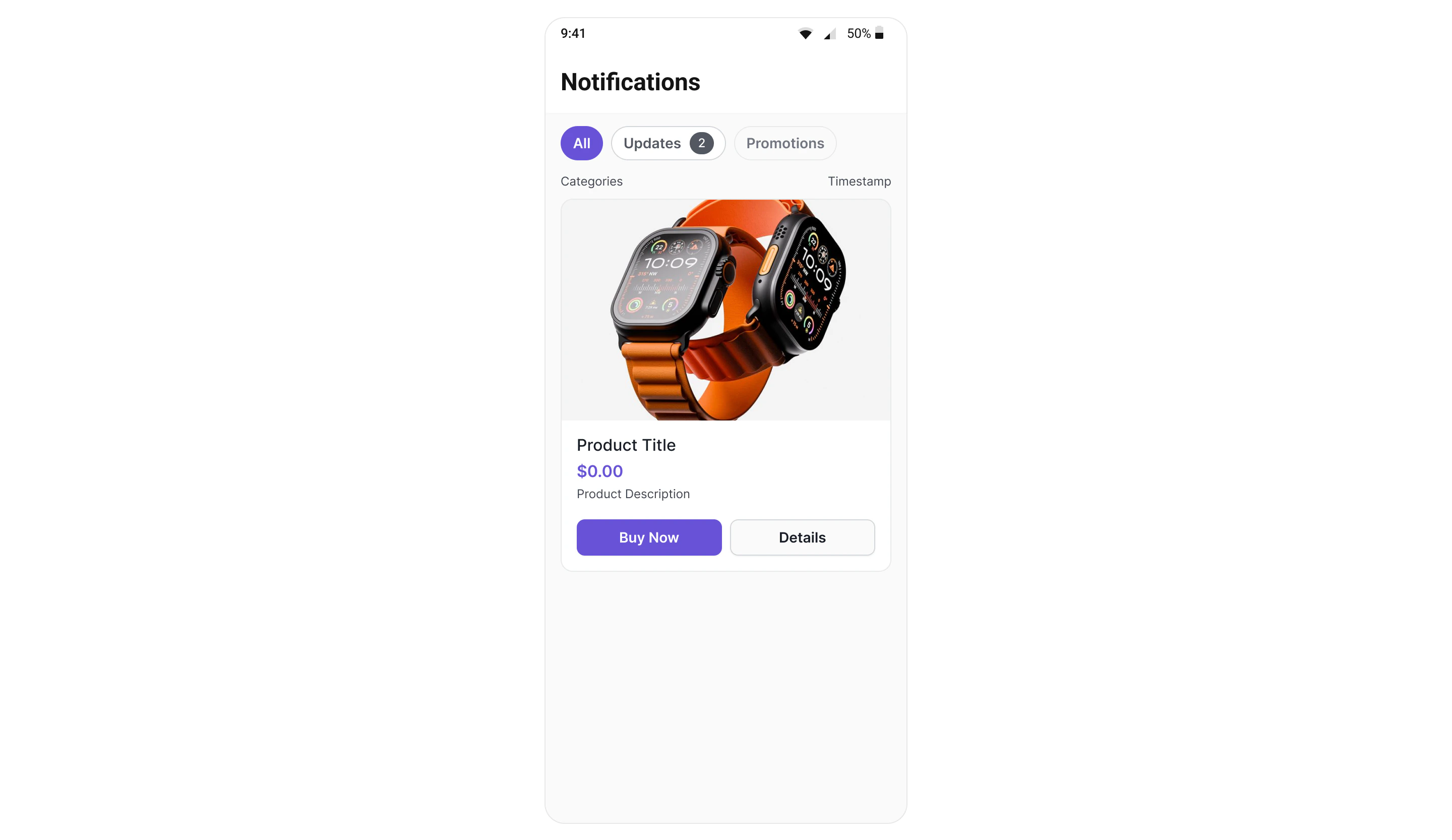
CometChatNotificationFeed displays a scrollable notification feed where each item is rendered as a native card using the CometChat Cards library. It handles fetching, pagination, category filtering, timestamp grouping, real-time updates, and read/delivered/engagement reporting automatically.Where It Fits CometChatNotificationFeed is a full-screen component. Drop it into an Activity, Fragment, or navigation destination. It manages its own data fetching, state, and real-time listeners — you just handle navigation callbacks. Jetpack Compose
Kotlin (XML Views)
@Composable fun NotificationsScreen (onBack: () -> Unit) { CometChatNotificationFeed ( modifier = Modifier. fillMaxSize (), showBackButton = true , onBackPress = onBack, onItemClick = { item -> // Handle item tap (e.g., open detail or deep link) } ) }
< com.cometchat.uikit.kotlin.presentation.notificationfeed.ui.CometChatNotificationFeed android:id = "@+id/notificationFeed" android:layout_width = "match_parent" android:layout_height = "match_parent" />
val feed = findViewById < CometChatNotificationFeed >(R.id.notificationFeed) feed. init ( this ) // Pass Activity or Fragment — needed to create the ViewModel feed.onItemClick = { item -> /* navigate */ } feed.onBackPress = { finish () }
Quick Start Jetpack Compose
Kotlin (XML Views)
@Composable fun NotificationsScreen () { CometChatNotificationFeed ( modifier = Modifier. fillMaxSize () ) }
override fun onCreate (savedInstanceState: Bundle ?) { super . onCreate (savedInstanceState) val feed = CometChatNotificationFeed ( this ) setContentView (feed) feed. init ( this ) // Required — binds the ViewModel to this Activity's lifecycle }
Prerequisites: CometChat SDK initialized with CometChatUIKit.init() and a user logged in.
Filtering Feed Items Control what loads using custom request builders:
Jetpack Compose
Kotlin (XML Views)
CometChatNotificationFeed ( feedRequestBuilder = NotificationFeedRequest. NotificationFeedRequestBuilder () . setLimit ( 30 ) . setReadState (FeedReadState.UNREAD) . setCategory ( "promotions" ) )
feed. setFeedRequestBuilder ( NotificationFeedRequest. NotificationFeedRequestBuilder () . setLimit ( 30 ) . setReadState (FeedReadState.UNREAD) . setCategory ( "promotions" ) ) feed. init ( this )
Filter Options Builder Method Description .setLimit(int)Items per page (default 20, max 100) .setReadState(FeedReadState)READ, UNREAD, or ALL.setCategory(String)Filter by category ID .setChannelId(String)Filter by channel .setTags(List<String>)Filter by tags .setDateFrom(String)ISO 8601 date lower bound .setDateTo(String)ISO 8601 date upper bound
Pass the builder object, not the result of .build(). The component calls .build() internally.
Actions and Events Callback Methods onItemClickFires when a feed item card is tapped.
Jetpack Compose
Kotlin (XML Views)
CometChatNotificationFeed ( onItemClick = { item -> // item.id, item.content (Card JSON), item.category } )
feed.onItemClick = { item ->
    // Handle item tap
}
onActionClickFires when an interactive element (button, link) inside a card is tapped.
Jetpack Compose
Kotlin (XML Views)
CometChatNotificationFeed ( onActionClick = { item, actionMap -> // actionMap contains action type and parameters val actionType = actionMap[ "type" ] as ? String when (actionType) { "openUrl" -> openBrowser (actionMap[ "url" ] as String) "chatWithUser" -> navigateToChat (actionMap[ "uid" ] as String) } } )
feed.onActionClick = { item, actionMap -> val actionType = actionMap[ "type" ] as ? String // Handle action }
onErrorFires when an internal error occurs (network failure, SDK exception).
Jetpack Compose
Kotlin (XML Views)
CometChatNotificationFeed ( onError = { exception -> Log. e ( "Feed" , "Error: ${ exception.message } " ) } )
feed.onError = { exception -> Log. e ( "Feed" , "Error: ${ exception.message } " ) }
onBackPressFires when the back button in the header is tapped.
Jetpack Compose
Kotlin (XML Views)
CometChatNotificationFeed ( showBackButton = true , onBackPress = { /* navigate back */ } )
feed. setShowBackButton ( true ) feed.onBackPress = { finish () }
Automatic Behaviors The component handles these automatically — no manual setup needed:
Behavior Description Real-time updates New items appear at the top via WebSocket listener Delivery reporting Items are reported as delivered when fetched Read reporting Items are reported as read after 1 second of visibility Unread count polling Polls unread count every 30 seconds to update badges Infinite scroll Fetches next page when scrolling near the bottom Pull-to-refresh Resets and fetches fresh data on pull Timestamp grouping Groups items as “Today”, “Yesterday”, day name, or date Category filtering Filter chips row for category-based filtering
Functionality Method (XML Views) Compose Parameter Description setTitle("Notifications")title = "Notifications"Header title text setShowHeader(true)showHeader = trueToggle header visibility setShowBackButton(false)showBackButton = falseToggle back button setShowFilterChips(true)showFilterChips = trueToggle category filter chips setFeedRequestBuilder(...)feedRequestBuilder = ...Custom feed request setCategoriesRequestBuilder(...)categoriesRequestBuilder = ...Custom categories request
Custom View Slots Replace the entire header:
CometChatNotificationFeed ( headerView = { Row ( modifier = Modifier. fillMaxWidth (). padding ( 16 .dp), verticalAlignment = Alignment.CenterVertically ) { Text ( "My Notifications" , style = CometChatTheme.typography.heading1Bold) } } )
State Views CometChatNotificationFeed ( emptyStateView = { Column ( modifier = Modifier. fillMaxSize (), horizontalAlignment = Alignment.CenterHorizontally, verticalArrangement = Arrangement.Center ) { Text ( "No notifications yet" ) } }, errorStateView = { exception, onRetry -> Column (horizontalAlignment = Alignment.CenterHorizontally) { Text ( "Something went wrong" ) Button (onClick = onRetry) { Text ( "Retry" ) } } }, loadingStateView = { Box (modifier = Modifier. fillMaxSize (), contentAlignment = Alignment.Center) { CircularProgressIndicator () } } )
Style Jetpack Compose
Kotlin (XML Views)
CometChatNotificationFeed ( style = CometChatNotificationFeedStyle ( backgroundColor = Color ( 0xFFF5F5F5 ), headerBackgroundColor = Color.White, headerTitleColor = Color ( 0xFF141414 ), chipActiveBackgroundColor = Color ( 0xFF3399FF ), chipActiveTextColor = Color.White, chipInactiveBackgroundColor = Color.White, chipInactiveTextColor = Color ( 0xFF727272 ), cardBackgroundColor = Color.White, cardBorderColor = Color ( 0xFFE0E0E0 ), cardBorderRadius = 12 .dp, unreadIndicatorColor = Color ( 0xFF3399FF ) ) )
feed. setStyle ( CometChatNotificationFeedStyle ( backgroundColor = Color. parseColor ( "#F5F5F5" ), headerTitleColor = Color. parseColor ( "#141414" ), chipActiveBackgroundColor = Color. parseColor ( "#3399FF" ), chipActiveTextColor = Color.WHITE, chipInactiveBackgroundColor = Color.TRANSPARENT, chipInactiveTextColor = Color.DKGRAY, cardBackgroundColor = Color.WHITE, cardBorderColor = Color. parseColor ( "#E0E0E0" ), unreadIndicatorColor = Color. parseColor ( "#3399FF" ) ))
Style Properties Property Description backgroundColorScreen background color headerBackgroundColorHeader bar background headerTitleColorHeader title text color headerBorderColorDivider below header chipActiveBackgroundColorSelected filter chip background chipActiveTextColorSelected filter chip text chipInactiveBackgroundColorUnselected filter chip background chipInactiveTextColorUnselected filter chip text chipBorderColorFilter chip border badgeActiveBackgroundColorActive chip badge background badgeActiveTextColorActive chip badge text badgeInactiveBackgroundColorInactive chip badge background badgeInactiveTextColorInactive chip badge text timestampTextColorSection header timestamp color cardBackgroundColorCard container background cardBorderColorCard container border cardBorderRadiusCard corner radius cardBorderWidthCard border width unreadIndicatorColorUnread dot indicator color separatorColorSeparator between cards
All colors default to Color.Unspecified (Compose) or 0 (XML) to inherit from CometChatTheme. Override individual values without losing theme support.
ViewModel Access The component uses CometChatNotificationFeedViewModel from the shared chatuikit-core module. You can provide a custom ViewModel for advanced scenarios:
val viewModel: CometChatNotificationFeedViewModel = viewModel ( factory = CometChatNotificationFeedViewModelFactory ( feedRequestBuilder = customBuilder, pollingIntervalMs = 60_000L // 1 minute polling ) ) CometChatNotificationFeed ( viewModel = viewModel )
ViewModel Factory Parameters Parameter Default Description feedRequestBuildernull Custom feed request builder categoriesRequestBuildernull Custom categories request builder enableListenerstrue Enable WebSocket listeners (false for testing) pollingIntervalMs30000 Unread count polling interval in ms
Common Patterns Show only unread items CometChatNotificationFeed ( feedRequestBuilder = NotificationFeedRequest. NotificationFeedRequestBuilder () . setReadState (FeedReadState.UNREAD) )
Hide filter chips and header Jetpack Compose
Kotlin (XML Views)
CometChatNotificationFeed ( showHeader = false , showFilterChips = false )
feed. setShowHeader ( false ) feed. setShowFilterChips ( false )
Custom categories request CometChatNotificationFeed ( categoriesRequestBuilder = NotificationCategoriesRequest. NotificationCategoriesRequestBuilder () . setLimit ( 10 ) )
Next Steps
Campaigns Feature Overview of how campaigns work end-to-end
SDK Campaigns API Low-level SDK APIs for feed items, categories, and engagement
Component Styling Full styling reference for all components
ViewModel & Data Custom ViewModels, repositories, and ListOperations